
Conoce exactamente dónde se están filtrando tus procesos de contratación, en tiempo real
PRODUCTO
3 min de lectura

El panel de rendimiento de Clara AI es una página de análisis en vivo integrada en la interfaz del reclutador. Rastrea el movimiento de los candidatos en cada etapa del embudo de contratación.
El panel muestra cuatro métricas:
progresión del embudo
actividad del embudo a lo largo del tiempo
tendencias de calidad de los candidatos
razones de rechazo
La mayoría de los equipos de contratación saben cuántos candidatos aplicaron.
Lo que les cuesta responder es dónde esos candidatos dejaron de progresar, por qué fueron rechazados y si la calidad de los candidatos está mejorando o deteriorándose.
El panel de rendimiento es donde reside esa visibilidad.
Conoce exactamente dónde está goteando tu embudo
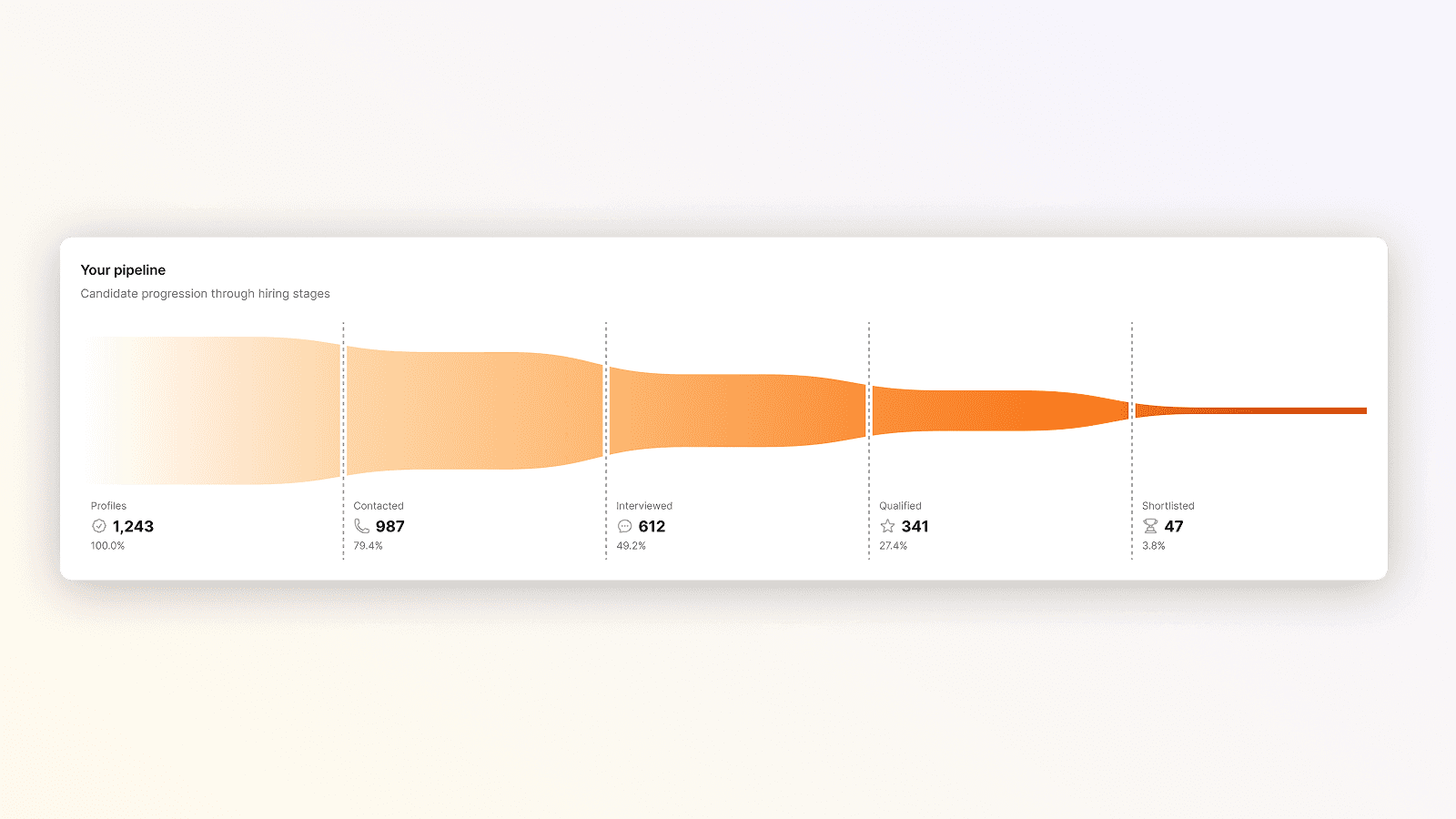
La progresión del embudo muestra el volumen de candidatos en cada etapa como un embudo horizontal: Perfiles, Contactados, Entrevistados, Calificados y Preseleccionados.
Cada etapa muestra el conteo y su porcentaje relativo al total de perfiles.
Si 83 candidatos fueron seleccionados pero solo 24 completaron una entrevista telefónica con IA (29%), la brecha entre Contactados y Entrevistados es tu mayor fuga.
Cada contador de etapa se vincula directamente a la lista de candidatos filtrada, para que puedas actuar sobre lo que encuentres.
Sigue las tendencias de volumen sin construir un informe
Entendiendo la actividad de tu embudo
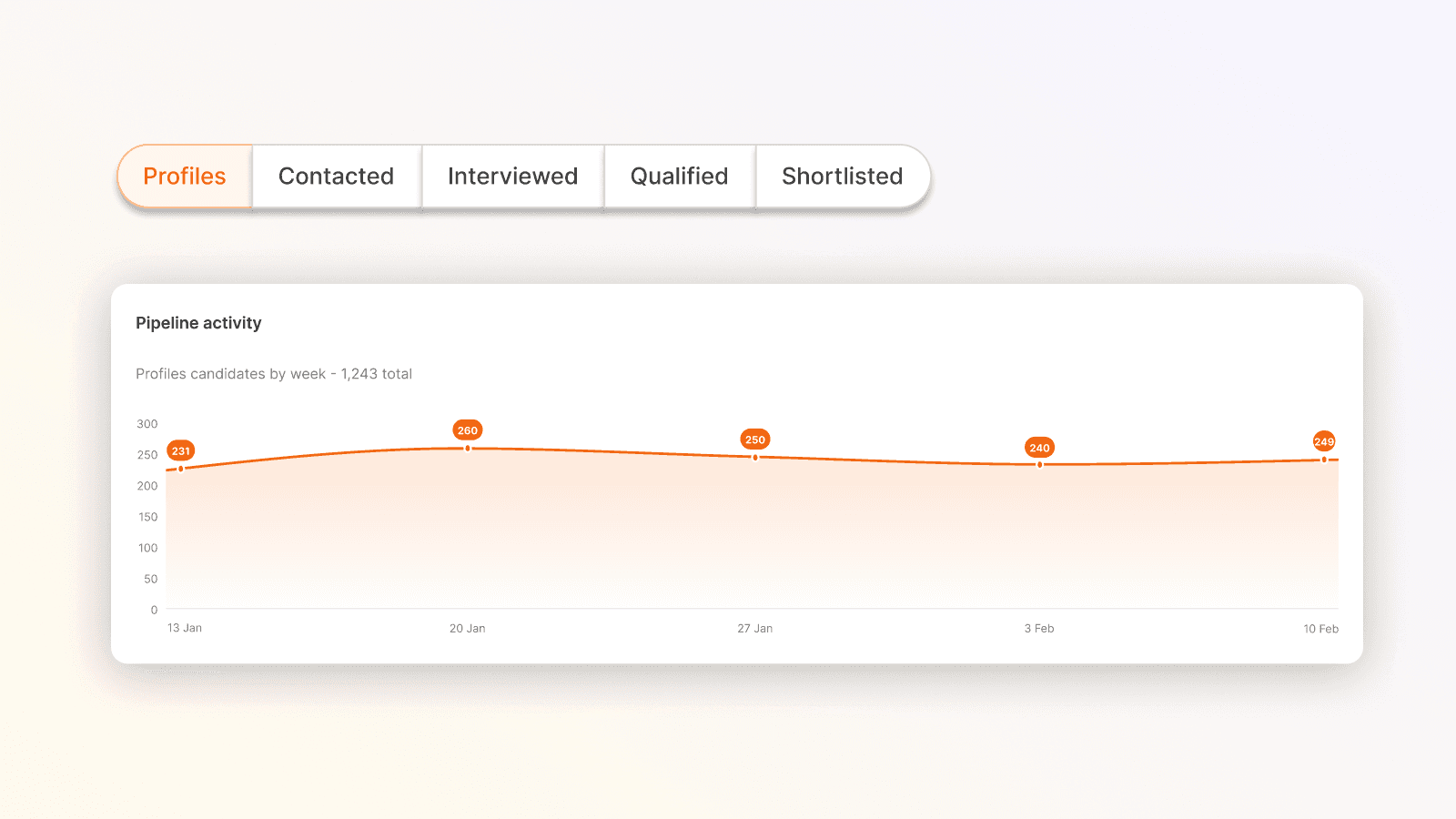
La actividad del embudo muestra el volumen de candidatos a lo largo del tiempo. Alterna entre etapas para ver si el volumen de aplicaciones se está convirtiendo en entrevistas o se está estancando en la parte superior del embudo.
Si ejecutaste una campaña en una bolsa de trabajo la semana pasada, así es como descubres si ha movido la aguja.
Identifica si la calidad de los candidatos está cambiando
El mismo diseño que tu actividad del embudo, la evolución de puntajes muestra la proporción de candidatos que reciben cada etiqueta de clasificación a lo largo del tiempo. Alterna entre Excelente, Genial, Bueno, Justo, Débil y Pobre.
Si la tasa de Pobre está aumentando, eso es una señal temprana para revisar la descripción del trabajo o los canales de búsqueda antes de que llegue el siguiente grupo.
Entiende las razones de rechazo a gran escala
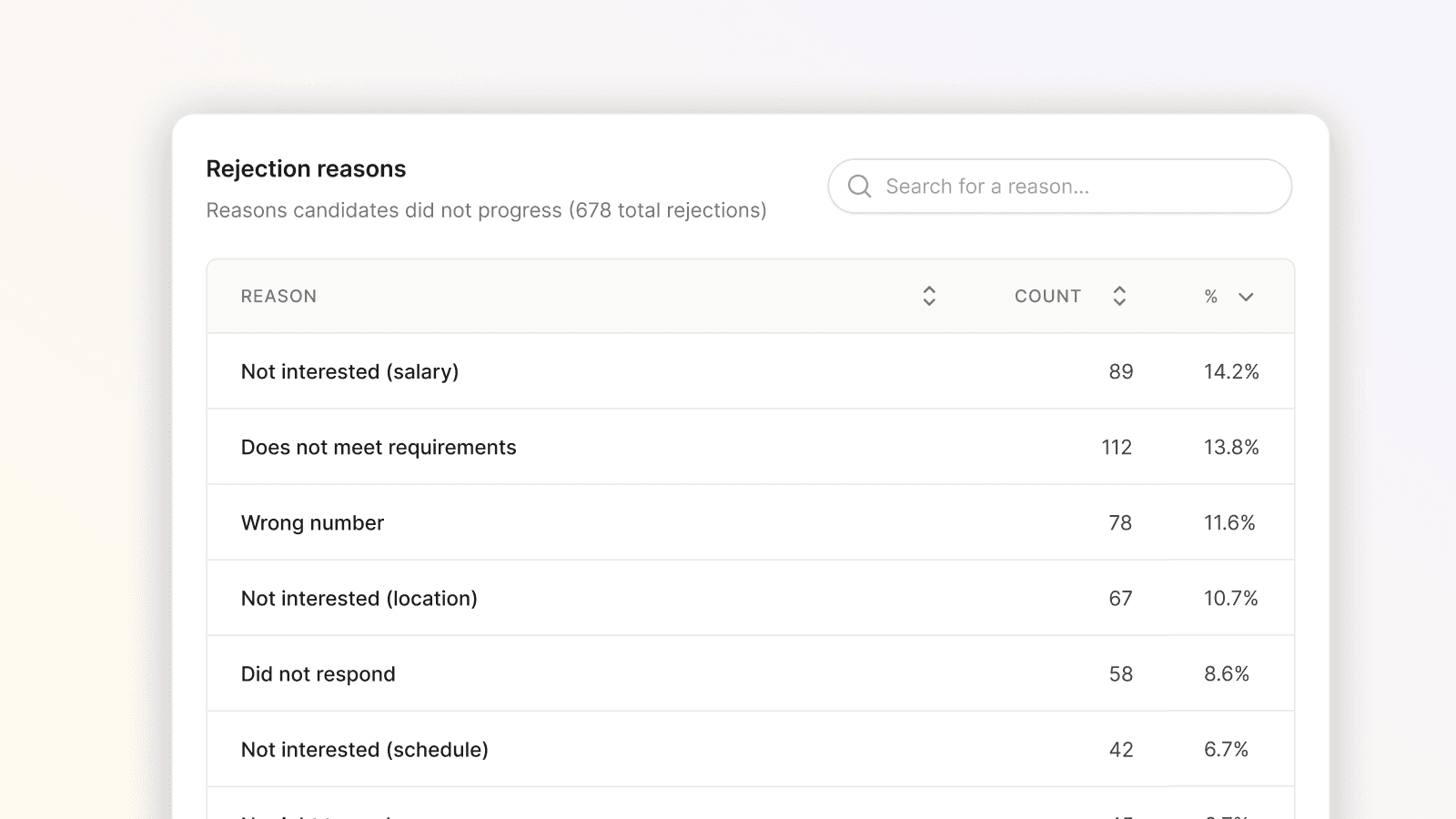
La tabla de razones de rechazo muestra cada motivo por el cual los candidatos no progresaron, ordenados por frecuencia, con un conteo y un porcentaje para cada uno.
La razón principal te dice cómo es realmente el mercado de candidatos para este rol.
Una barra de búsqueda te permite verificar una razón específica de la que has oído hablar de manera anecdótica. Filtrar a un solo trabajo lo reduce al perfil de rechazo de ese rol.
Lo que esto significa para tu equipo
Antes de esto, responder "¿dónde está goteando nuestro embudo en el rol de operario de almacén?" significaba extraer datos de múltiples lugares y esperar.
Ahora es instantáneo.
Los reclutadores pueden revisar la salud del embudo antes de una reunión de contratación, los líderes de RRHH pueden comprobar si un cambio en la búsqueda funcionó, y todos acceden a la lista de candidatos relevantes en un clic.
El panel de rendimiento está disponible para todos los usuarios de Clara AI.
Inteligencia
Explore more articles



SABER MÁS
¿Preparado para contratar al mejor talento, más rápido?
Clara es fácil de configurar y aún más rápida a la hora de contratar.